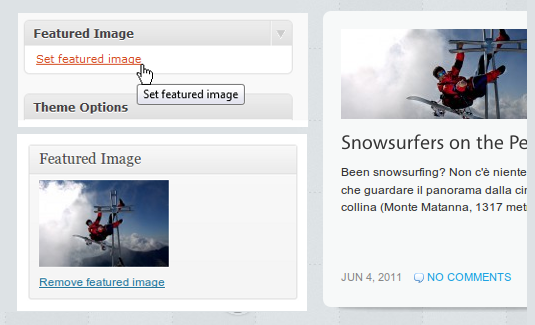
 There area a lot of so-called “Premium” themes which are supporting WordPress 3.x. However not everyone of them is perfectly up-to-date with all the WP3 features, eg they don’t implement the “Set Featured Thumbnails” function. Here’s a solution:
In this article Rusty Smith explains how make use of “Set Featured Thumbnails” in Arthemia, editing four files: functions.php, index.php, archive.php and the stylesheet. Since Arthemia originally makes use of the Timthumb script, the deal is to make rid if it and substitute it with the post_thumbnail function.
Just check the instructions here: Post Thumbnails and Arthemia
As for its commercial brother, Arthemia Premium, your mileage may vary: you’ll probably have to look for a slightly different code (starting with a condition) and modifiy it like this:
<!-- keeping theme condition -->

<?php $status = get_settings ( "cp_thumbAuto" );
    if ( $status != "first" ) { ?>

<!-- adding post_thumbnails support snippet -->

<a href="<?php the_permalink() ?>" rel="bookmark" title="Permanent Link to <?php the_title(); ?>">
<?php the_post_thumbnail( 'featured-thumbnail' ); ?></a>

<!-- end of the main post_thumbnails support snippet -->

<?php } else { ?>

<a href="<?php the_permalink() ?>" rel="bookmark" title="Permanent Link to <?php the_title(); ?>">
<?php the_post_thumbnail( 'featured-thumbnail' ); ?></a>

<?php } ?>

<!-- end of theme condition -->
Please note that
1) the code above is redundand but i wanted to keep the structure of the theme. One can also make it much shorter, using only the two-line snippet which is marked with comments
2) the line <?php the_post_thumbnail( ‘featured-thumbnail’ ); ?></a>
will be different if you are editing the chunck of code which is referred to the smallest image named “featured-thumbnail” or to the biggest “headline-thumbnails” (see functions.php), so you’ll alternatively use:
<?php the_post_thumbnail( 'headline-thumbnail' ); ?></a>
or
<?php the_post_thumbnail( 'spoiler-thumbnail' ); ?></a>
or
<?php the_post_thumbnail( 'featured-thumbnail' ); ?></a>
Other themes that lack the “post_thumbnails” features can be modified using the same principles, eg using the older but still useful tutorial from Mark Iaquith: New in WordPress 2.9: Post Thumbnail Images.
Have fun!
Leave a Reply